Python: Reading check-digit codes from images, barcode first
Introduction
A lot of printed codes carry a check digit: product barcodes (EAN-13), book numbers (ISBN), bank accounts (IBAN). I wanted to know how far I can trust a pipeline that reads them from a photo, so I built one: decode the barcode first, fall back to OCR on the printed digits, and use the check digit to validate, or even repair, what OCR read.
The images are synthetic, so I always know the right answer. That let me measure every step instead of guessing.
Check digits in a nutshell
A check digit is one extra digit computed from the others. If any digit is read wrong, the math stops adding up.
EAN-13 multiplies the first 12 digits by alternating weights 1 and 3, and the 13th digit is whatever makes the total a multiple of 10:
def gtin_check_digit(body: str) -> int:
    ds = [int(c) for c in body]
    # weights start at 3 from the rightmost body digit
    total = sum(d * (3 if i % 2 == 0 else 1) for i, d in enumerate(reversed(ds)))
    return (10 - total % 10) % 10
IBAN uses mod 97. Move the first four characters to the end, turn letters into numbers (A = 10, B = 11, …), and the whole thing must leave remainder 1 (simplified, the repository also checks length per country):
def is_valid_iban(iban: str) -> bool:
    s = iban.replace(" ", "").upper()
    return _iban_to_int(s[4:] + s[:4]) % 97 == 1
Look at the output:
$ python
>>> gtin_check_digit("400638133393")
1
>>> is_valid_iban("GB82 WEST 1234 5698 7654 32")
True
What they guarantee is narrow. EAN-13 catches every single wrong digit, and every swap of two neighbor digits, except when the two digits differ by 5. Mod 97 catches every single wrong character and every swap of two neighbor digits. Both are checked by the tests in the repository, not just stated here.
Generating the labels
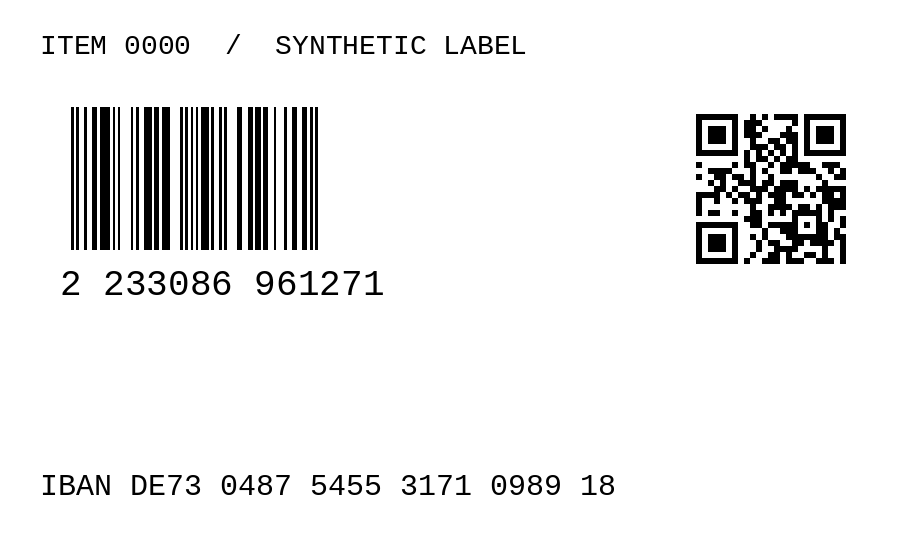
Each label is drawn with PIL: an EAN-13 barcode with its digits printed
below, a QR code holding IBAN:..., and the IBAN printed as text.
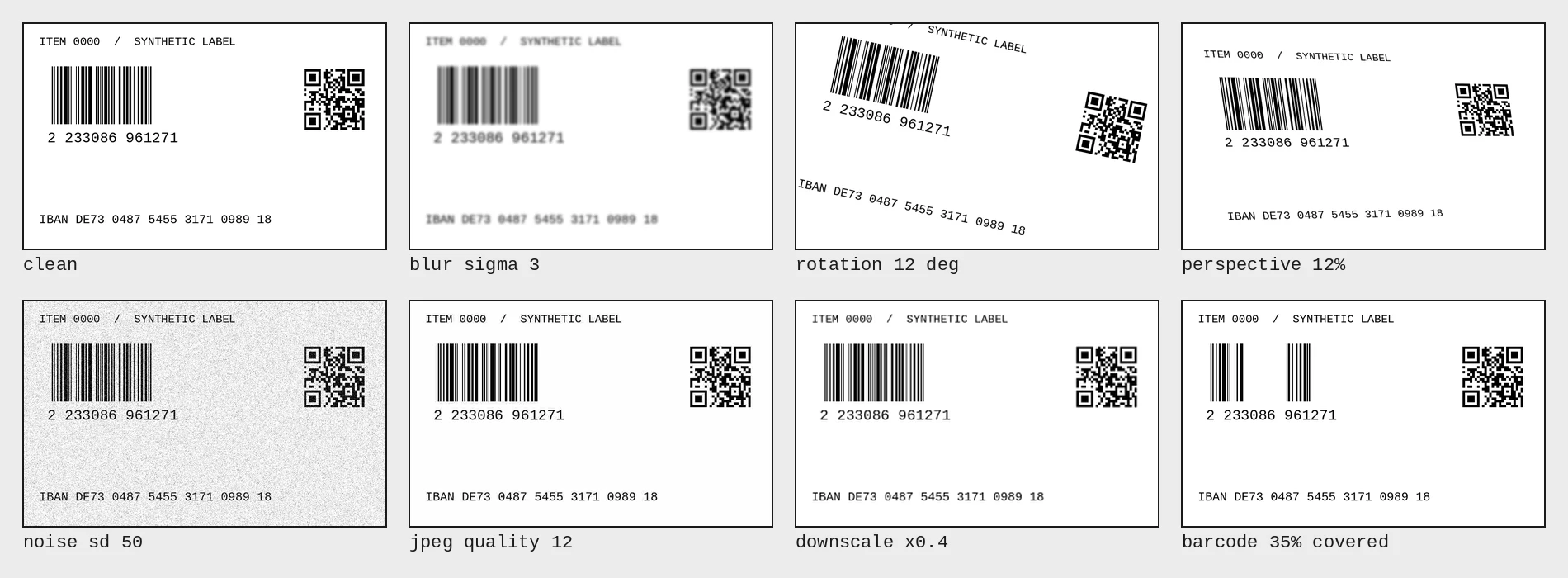
Then each label gets one degradation at a time, at six levels: blur, rotation, perspective, noise, JPEG compression, downscaling, and a white band covering part of the barcode. 40 labels per level, 1680 images in total, all from a fixed seed. The same 40 labels are used for every level, so a difference between levels isn’t a difference between labels.
Barcode first
Decoding a symbol is cheap and has its own error detection, so it goes
first. pyzbar returns both the EAN-13 and the QR code:
for sym in pyzbar.decode(img):
    data = sym.data.decode("ascii", errors="replace")
    if sym.type == "EAN13":
        out["ean"] = data
    elif sym.type == "QRCODE" and data.startswith("IBAN:"):
        out["iban"] = data[5:]
OCR as fallback
When the symbol fails, the printed text is still there. I run Tesseract twice, on the raw image and on a preprocessed one:
- upscale small images
- deskew by searching the angle where text lines are sharpest
- contrast and adaptive threshold
- remove the barcode bars with a vertical morphological opening
The bars matter more than I expected. Tesseract read them as
999999999999 and, with --psm 6, sometimes returned nothing at all
for a perfectly clean label. Removing the bars and trying both --psm 6
and --psm 11 fixed it.
An OCR read is only accepted if it passes its checksum.
Read rates under degradation
Share of the 40 labels read correctly, per degradation level:
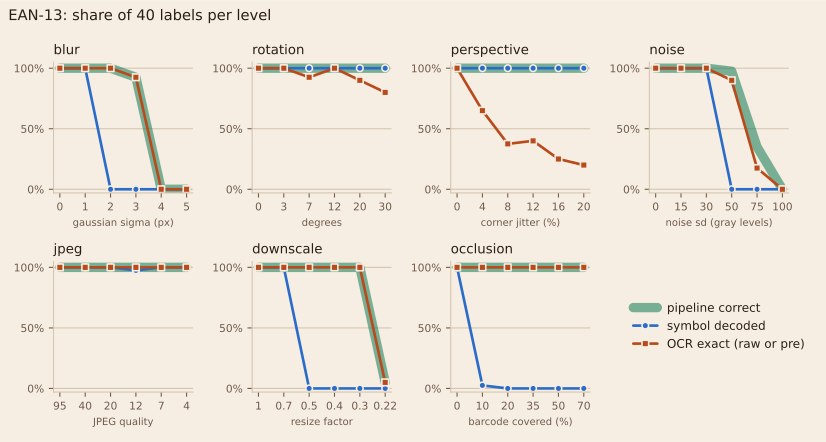
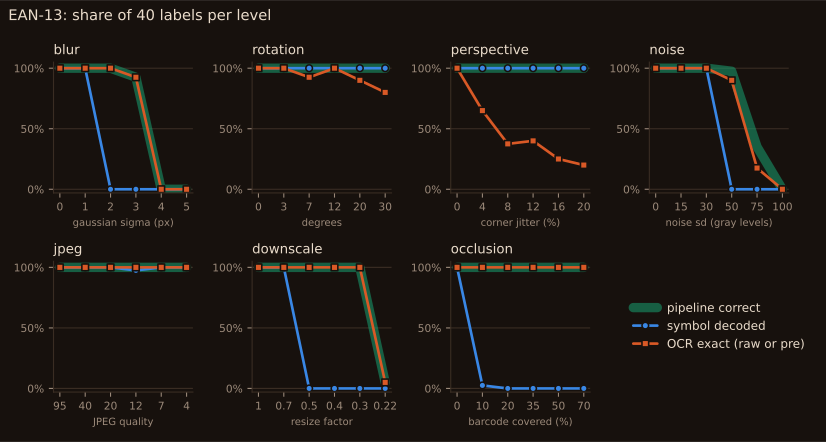
Notice how the barcode is the first thing to break. With blur sigma 2, 10% of the barcode covered, or the image at half size, pyzbar decodes almost no EAN-13 (2.5% at 10% occlusion, 0% in the other two), while OCR still reads the printed digits in 97.5% to 100% of the labels.
The IBAN, inside a QR code, behaves differently:
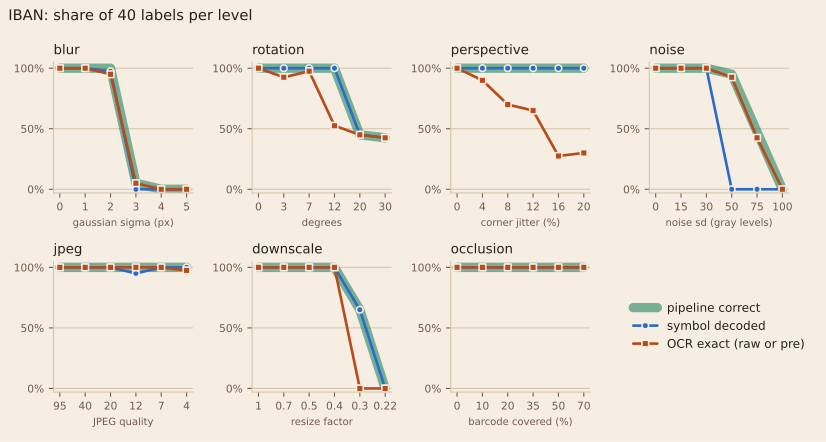
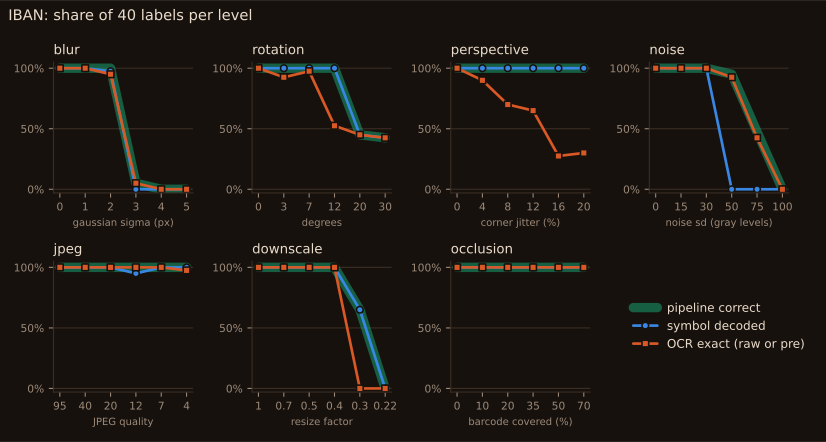
The QR code survives blur, occlusion and downscaling much better than the barcode. It fails on more than half of the labels from 20 degrees of rotation, and on all of them with noise of 50 gray levels, and that’s where the pipeline loses most IBANs.
Preprocessing isn’t free either:
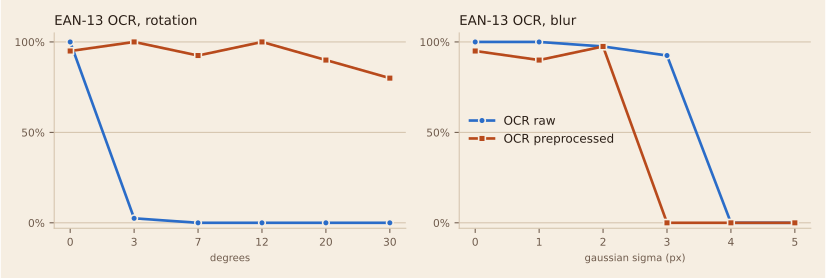
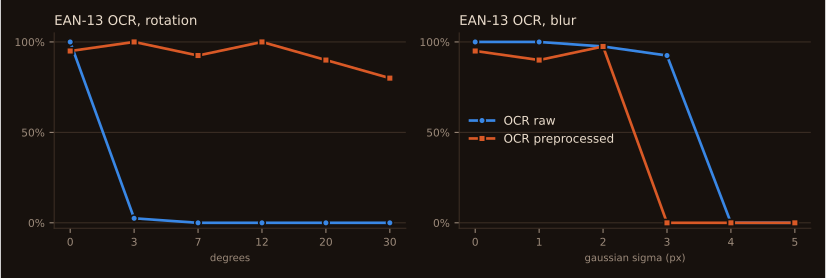
With 3 degrees of rotation, raw OCR reads 2.5% of the EAN-13s and the preprocessed image reads 100%. With blur sigma 3 it flips: raw reads 92.5%, preprocessed reads 0%. That’s why the pipeline keeps both reads.
Repairing from the checksum
When OCR reads something that fails the checksum, it’s tempting to fix it: try every single-digit change and keep the one that passes.
from checkdigit_vision.domain.checksums import is_valid_ean13
from checkdigit_vision.domain.repair import fill_erasures, single_error_candidates

truth = "4006381333931"

# OCR could not read the 5th digit at all
print(fill_erasures("4006?81333931", is_valid_ean13))

# OCR read the 8th digit as 8 instead of 3
candidates = single_error_candidates("4006381833931", is_valid_ean13)
print(len(candidates), truth in candidates)
print(candidates[:4])
Look at the output:
$ python repair_demo.py
['4006381333931']
13 True
['4001381833931', '4006331833931', '4006381333931', '4006381833431']
When I know which digit is missing, there is exactly one answer. When I don’t know which digit is wrong, 13 different codes pass the checksum, and nothing tells me which one was printed. One check digit is one equation: it can solve one unknown, not find it.
So the pipeline only repairs when exactly one candidate is left. Here is what each step added over the 1680 images:
| field | policy | correct | wrong | rejected |
|---|---|---|---|---|
| EAN-13 | symbol only | 1040 | 0 | 640 |
| EAN-13 | + OCR (preprocessed) | 1423 | 0 | 257 |
| EAN-13 | + OCR (raw) | 1482 | 0 | 198 |
| EAN-13 | + checksum repair | 1492 | 12 | 176 |
| IBAN | symbol only | 1338 | 0 | 342 |
| IBAN | + OCR (preprocessed) | 1384 | 0 | 296 |
| IBAN | + OCR (raw) | 1397 | 1 | 282 |
| IBAN | + checksum repair | 1400 | 6 | 274 |
Notice how every step up to OCR only turns rejections into correct reads. Repair is different: for EAN-13 it added 10 correct reads and 12 wrong ones.
11 of those 12 came from filling one unreadable digit, and the demo above already shows why: with one erasure, the checksum always leaves exactly one candidate, so “only one candidate” proves nothing. In all 12, OCR had also misread other digits it didn’t flag, and the repair built a valid code on top of them.
The one wrong IBAN accepted straight from OCR is a mod 97 collision, under the heaviest noise:
printed = "GB78AZTR29158378389299"
ocr = "GB78AZIR20158378385290"

print(is_valid_iban(printed), is_valid_iban(ocr))
print(sum(a != b for a, b in zip(printed, ocr)), "characters differ")
Look at the output:
$ python collision.py
True True
4 characters differ
Four characters wrong, and the checksum still closes. Beyond the errors it was designed for, a check digit is a probability, not a guarantee.
Notes
The labels are synthetic: one font, one layout, no paper texture, no real lighting. The rates describe this setup, not every camera.
Perspective is the weak spot of the OCR side. The labels have no visible edge, so there’s nothing to rectify against, and OCR drops to 10% at the strongest level. The symbols carry the pipeline there.
All numbers come from results/ in the repository, and the results file
has the same hash on every run with the same seed.
Conclusion
Read the symbol first, fall back to OCR, and accept only what passes the checksum: on these images that combination made no wrong EAN-13 reads. The check digit is very good at saying “this is wrong”. Asking it to say what’s right is where the wrong answers came in.